

Every booking on playactivate.com touches two different websites. The marketing site is Activate’s. The checkout, the slide-out where you pick a date and pay, is ROLLER's, running on ecom.roller.app inside a frame. Measurement has to work across that boundary, and almost everything in this knowledge base is a consequence of how we do that.
There are three pieces.
The corporate container runs on every page of playactivate.com. It owns the shared tracking: page views, Book Now clicks, GA4, and the ad platforms Activate runs centrally. It also hosts the listener that receives booking events from the checkout.
Partner containers load only on a partner's own location pages on the location_selected event. They let a partner run their own pixels and conversions against their own traffic. A partner container never loads on another partner's pages or on the global pages of the site.
The bridge container lives inside the ROLLER checkout and is identical for every venue, corporate or partner. ROLLER pushes booking events (add to cart, checkout, purchase, with items and value) to its own dataLayer inside the frame. The bridge picks those up and relays them to the marketing site using postMessage, where the corporate container's listener puts them on the site's dataLayer.
It contains exactly two things: the sender, which relays ROLLER's events out of the frame, and the enhanced conversions capture, which collects the hashed customer fields for ad platform matching. Nothing else goes in it. Partner tracking, pixels, and conversions all live in the partner's own container on the marketing site, never in the bridge.
Do not remove or replace the bridge container. Ever.
Container ID:
GTM-562HKMS. It is entered in the Google Tag Manager field of every venue's ROLLER account, and that field must contain this ID and only this ID.If it is removed from a venue, that venue's bookings stop reaching the marketing site, GA4, BigQuery, and every ad platform, for corporate and for the partner, with no error and no warning. The checkout keeps working, so nobody notices until the reports go wrong. If it is replaced with a different container, the same thing happens.
This applies to everyone with access to a venue's ROLLER settings: Activate corporate, partner operators, ROLLER support, and any agency. If you think a venue needs different tracking inside the checkout, raise it with the analytics team. Do not edit the ROLLER GTM field.
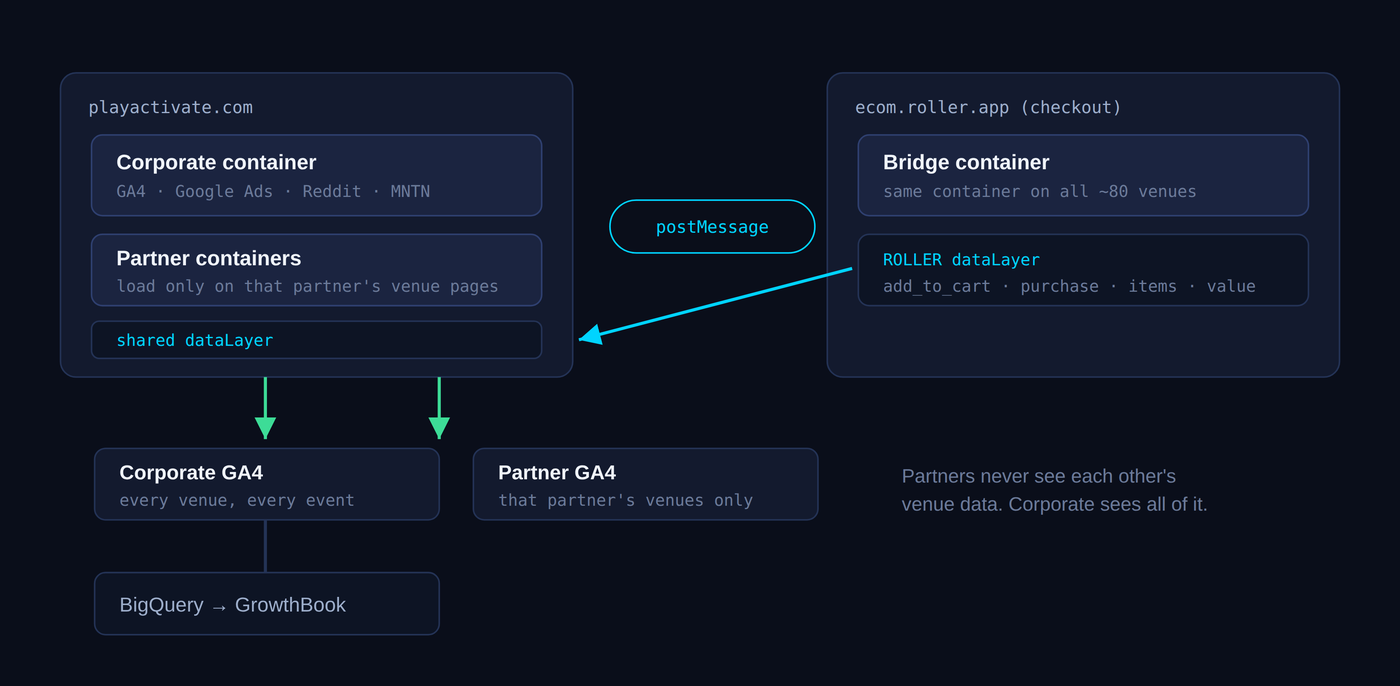
Once a booking event is on the site's dataLayer, it fans out to wherever it needs to go: the corporate GA4 property, which sees every venue and every event, and any partner GA4 property, which sees only that partner's venues. From corporate GA4 the data flows into BigQuery, which is where deeper analysis and the experiment reporting in GrowthBook come from.
The detail worth remembering: nothing sends analytics from inside the checkout directly → If there is a GA4 in Your Roller Property, it is best to remove it. Every booking event is relayed out to the marketing site first and sent from there. That is what lets one visitor's journey, from landing page to purchase, show up as one session with one set of parameters, instead of two disconnected halves. The next article explains why we chose that over letting ROLLER send to GA4 on its own.